
The Complete Guide to Automating Bankruptcy Legal Document Submission (April 2026)
Most bankruptcy firms think automating legal document submission means faster templates. But templates still leave you copying data between systems, tracking follow-ups in spreadsheets, and manually routing filings to the right court. Real automation removes those handoffs entirely, so client intake flows directly into petition drafts, missing documents trigger their own follow-ups, and filings route themselves based on case type. When you're running 50+ cases a month, those gaps between steps are where your capacity ceiling lives.
TLDR:
- Automating document workflows cuts preparation time by up to 70% for high-volume case types
- AI agents handle follow-ups and data population between steps without paralegal intervention
- Start with repetitive documents like Chapter 7 petitions where volume is high and variation is low
- End-to-end automation removes manual handoffs that cause delays, errors, and capacity bottlenecks
- Glade connects intake through court filing in unified workflows with embedded AI agents and native payments
What Legal Document Submission Automation Covers
Legal document submission automation covers the full lifecycle of a document, from preparation and review through filing and confirmation tracking. That's a wider scope than most people expect.
Document assembly tools generate templates. Document management systems store files. Automation goes further: it connects those steps into a single, moving workflow where each completed action triggers the next. A client submits a form, that data populates a petition draft, the attorney reviews and approves, and the filing gets routed to the right court system without anyone manually moving information between steps.
For law firms, this distinction matters. Replacing a template tool with automation is like replacing a notepad with a workflow. The output looks similar, but the day-to-day reality is completely different. Automation removes the handoffs where delays and errors accumulate.
What Gets Connected in a Document Workflow
The real value sits in the handoff points that manual processes leave exposed. A well-built automated workflow ties together:
- Client intake data that flows directly into document fields through a Document Agent, cutting out the re-entry step that introduces typos and inconsistencies.
- Attorney review queues that surface the right documents at the right time, instead of relying on someone to remember or follow up.
- Court-specific filing rules that get applied automatically before submission, catching formatting or completeness issues before they become rejections.
The Hidden Cost of Manual Document Submission Workflows

Small firms spend only 60% of their time on actual client work. The remaining 40% goes to chasing documents, re-entering data, and managing follow-ups. For a firm billing at $250/hour, that adds up to a real revenue gap every week.
The productivity loss is one problem. The growth ceiling is another. When paralegals spend their day on follow-up calls and manual data entry, case capacity is capped by headcount. New hires add cost before they add revenue, and take months to become productive.
Manual workflows also quietly introduce errors. A document field copied from an email, a deadline tracked in a spreadsheet: each step is a place where something goes wrong. In legal work, errors mean rejections, delays, and client frustration.
For firms handling 50+ cases per month, the math compounds fast. What feels manageable at 20 cases becomes genuinely unsustainable at scale.
Key Components of Document Submission Automation Systems
Any automation system is only as good as the components underneath it. These aren't isolated features: they form a chain, and a weak link in any one of them breaks the whole workflow.
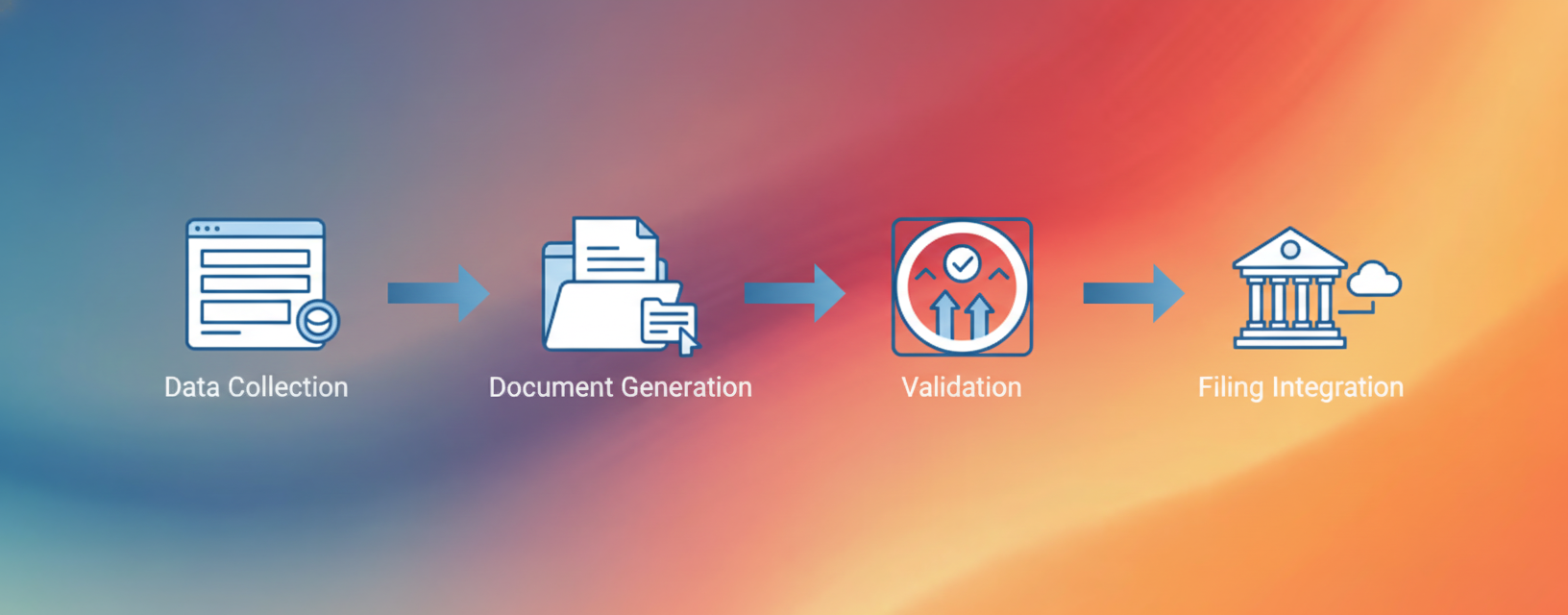
Data Collection
The starting point for any submission workflow. Forms, intake portals, and client-facing document requests pull in structured information that feeds everything downstream. Without clean data collection, every subsequent step requires manual correction.
Template Logic and Document Generation
Rules that map collected data to the right document fields. When a client's intake answers populate a petition draft automatically, that's template logic doing its job.
Validation
Pre-submission checks that catch errors before a document reaches a court system. Formatting rules, completeness checks, and jurisdiction-specific requirements all get applied here.
Filing Integration
The final handoff. Automated routing to the right court system or e-filing portal, with confirmation tracking so nothing disappears into a queue unnoticed.
When choosing automation capabilities, look for systems where these components share the same data layer. Building blocks like document requests, form submissions, and workflow statuses should work as connected steps, not separate tools you have to manually bridge.
Which Legal Documents to Automate First
Not every document type is worth automating right away. Start where repetition is highest and variation is lowest.
Automation cuts preparation time by up to 70% for standard contracts and compliance forms. That stat holds because those documents follow predictable patterns. The same fields, the same structure, filed through the same channels. When a document type looks like that, automation delivers fast returns.
Three questions help sort your document backlog:
- How often does this document type get prepared? High volume means faster payback on the time invested in setup.
- How much does it vary case to case? Low variation means less custom logic to build and fewer edge cases to account for.
- What happens when it's wrong? High rejection risk makes pre-submission validation especially valuable.
For most bankruptcy firms, Chapter 7 petitions, retainer agreements, and credit counseling certificates hit all three criteria. Immigration firms see similar returns on I-485 packages and employment authorization documents. These are the right starting points.
Complex, one-off documents like litigation briefs or negotiated contracts can come later. Automate what you do repeatedly first, get the process running cleanly, then expand from there.
The Role of AI Agents in Document Submission Workflows
Static automation follows rules. AI agents make decisions.
The difference matters in practice. A rule-based system flags a missing field and stops. An AI agent identifies the gap, checks whether the information exists elsewhere in the case file, and either fills it or routes the exception to the right person with context already attached. That's autonomous action, not a conditional if/then.
In document workflows, this shows up at every step, from intake through final filing to routine status updates. Agents extract data from uploaded files, cross-reference it against what's already in the case, pre-populate petition drafts, and run pre-submission checks without waiting for someone to trigger the next step.
The distinction between a tool you use and a system that works for you comes down to whether the AI is waiting for instructions or already executing them.
Glade's AI agents are embedded inside workflows, not layered on top. A paralegal doesn't prompt the agent to chase a missing document. The agent is already tracking submissions, sending follow-ups, and surfacing exceptions that need human review.
Human judgment stays in the loop at the right points. Attorneys review and approve before anything gets filed. The agents handle the repetitive execution work so that review is actually the job, not an afterthought between administrative tasks.
Common Implementation Challenges and How to Avoid Them
Most automation projects stall in implementation, not in planning. The friction is predictable, which means it's avoidable with the right setup.
Where Things Go Wrong
- Legacy systems that don't expose clean data outputs create integration headaches from day one. Audit your current tools before committing to any automation setup. If your case management software can't reliably export structured data, that becomes your first problem to solve.
- Staff resistance is real, but it's usually about trust, not laziness. People who've built workarounds over years need to see the new system work before they'll stop using their spreadsheets. Pilot with one workflow template, show the results, then expand.
- Data quality issues surface fast. Inconsistent naming, missing fields, and free-text entries break automation rules. Standardizing intake forms before automating downstream steps saves considerable rework.
- Workflow standardization is a prerequisite, not a byproduct. You can't automate a process that isn't defined yet. Standardization needs to happen before automation can deliver real results.
From Document Creation to Court Filing: Building End-to-End Automation
End-to-end automation only works if each stage hands off cleanly to the next. The moment two steps require a person to manually move information between them, you've reintroduced the exact problem automation was supposed to solve.
The full journey runs roughly like this:
- Client intake data is captured through a structured portal and flows directly into case fields, so nothing needs to be re-keyed by staff.
- Document requests go out automatically, with follow-ups triggered by what's still missing from the file.
- Collected data populates petition drafts without manual re-entry at each stage.
- Pre-submission validation runs against court-specific requirements before anything leaves the system.
- The filing routes to the correct court or e-filing portal based on case type and jurisdiction.
- Confirmation tracking closes the loop so no submission quietly disappears into a queue.
Each step feeds the next through a shared data layer. That's what separates a unified workflow from a stack of point tools stitched together with manual handoffs. When those handoffs disappear, so do the delays and errors that live inside them.
Workflow Stage | Manual Process | Automated Process with Glade |
|---|---|---|
Client Intake | Staff manually enters client responses from emails, phone calls, or paper forms into case management system. Data gets re-keyed multiple times across different systems. | Client submits information through structured portal. Data flows directly into case fields without re-entry. Form Requests capture structured data that populates downstream documents automatically. |
Document Collection | Paralegal sends individual email requests, tracks responses in spreadsheet, makes follow-up calls for missing items. No visibility into what's outstanding without checking multiple places. | Document Requests automatically track what's collected and trigger follow-ups on missing items. AI agents identify gaps and send contextual reminders without paralegal intervention. |
Document Preparation | Staff manually copies data from intake forms into petition templates. Each field requires individual attention. Errors introduced through typos and inconsistent formatting. | Collected data pre-populates petition drafts through Document Agent. Template logic maps intake answers to correct fields. Drafts ready for attorney review without manual data entry. |
Quality Validation | Attorney or senior paralegal manually reviews documents against court requirements. Formatting issues and missing fields show up late in process, requiring rework. | Pre-submission validation runs automatically against court-specific requirements. Completeness checks and formatting rules applied before attorney review. Exceptions surfaced with context attached. |
Court Filing | Staff manually logs into court e-filing system, uploads documents, fills out filing forms, tracks confirmation numbers in separate spreadsheet. No automated routing based on case type. | Filing routes automatically to correct court or e-filing portal based on case type and jurisdiction. Confirmation tracking closes loop so no submission disappears into queue. |
Client Communication | Paralegal manually sends status updates via email when they remember or client follows up. No systematic tracking of what's been communicated. | Customer Management Agent sends automated status updates at key milestones. Clients receive confirmation tracking without waiting on staff availability. |
Payment Processing | Invoices generated separately after work completed. Staff manually tracks payments, sends reminders, matches up records across systems. Collection cycles extend due to delays. | Finance Agent embeds invoicing in workflow. Native payments processed at appropriate milestones. Collection cycles shortened as billing happens in real-time instead of after the fact. |
Human review stays where it belongs: before the filing goes out. Attorneys approve the finalized document. The AI agents handle every repetitive step in between.
How Document Submission Automation Supports Firm Growth
Firms getting the most out of automation aren't using it to cut costs. They're using it to take on more cases without hiring ahead of revenue.
When document workflows run in the background, paralegal capacity stops being the bottleneck. Staff managing 40 active cases can handle 80. Case volume scales without a proportional headcount increase, which means revenue grows faster than overhead.
Speed matters for client experience too. Clients who receive document requests, status updates, and confirmation tracking automatically without waiting on a staff member to remember the follow-up report noticeably better experiences. That drives referrals and retention, both of which compound over time.
Native payments close the loop through a Finance Agent. When invoicing is embedded in the workflow instead of handled separately after the fact, collection cycles shorten and revenue hits the books faster.
Automate Legal Document Submission with Glade's AI Workflows
Every challenge covered in this guide sits inside Glade's workflow architecture by design.
The building blocks handle the mechanics: Document Requests track what's been collected and trigger follow-ups on what hasn't. Form Requests capture structured client data that flows directly into petition drafts. Workflow statuses surface which cases need attention without anyone manually checking. Native payments close the billing loop without a separate system.
The AI agents handle the execution between those steps. Follow-ups go out without paralegal prompting. Missing documents get flagged with context. Petition drafts get pre-populated from collected data before an attorney ever opens the file.
For bankruptcy firms running Chapter 7 or Chapter 13 workflows, that's intake through court-ready filing without the manual handoffs that slow everything down. Immigration firms get the same structure applied to high-volume document packages.
Glade connects the full document submission process inside a single case workflow, so every step feeds the next and human review happens where it actually matters. Book a demo to see it in action.
Final Thoughts on Scaling Your Firm With Document Automation
The firms scaling fastest right now treat legal document submission automation as a growth driver, not a cost-cutting project. When your workflows run without manual handoffs, case capacity grows faster than overhead, and your team stops spending 40% of their time on administrative follow-up. Clients notice the difference in speed and consistency, which compounds into better retention and referrals. Book a demo to see how Glade connects intake through filing in one workflow.
FAQ
How does document submission automation differ from document assembly tools?
Document assembly tools generate templates, while automation connects the entire workflow from data collection through filing confirmation. Automation removes the manual handoffs between steps where delays and errors typically occur, so information flows from intake to court submission without re-entry.
Which document types should law firms automate first?
Start with high-volume, low-variation documents like Chapter 7 petitions, retainer agreements, or standard compliance forms. These deliver the fastest returns because they follow predictable patterns and get prepared repeatedly, making the time invested in setup worthwhile.
What happens to attorney review when AI agents handle document workflows?
Attorneys still review and approve all documents before filing. That doesn't change. AI agents handle the repetitive execution work like chasing missing documents, pre-populating petition drafts, and running pre-submission checks, so review becomes the actual job instead of an afterthought between administrative tasks.
How long does it take to implement document submission automation?
Most firms can get their first workflow running within a few hours of setup, with full optimization taking 1-2 weeks depending on case complexity and existing data quality. The key is starting with one standardized workflow, proving it works, then expanding from there.
Can document automation actually help a firm take on more cases without hiring?
Yes. When workflows run in the background, paralegal capacity stops being the bottleneck. Firms using automation report staff managing 40 active cases can handle 80, letting case volume scale without proportional headcount increases, which means revenue grows faster than overhead.